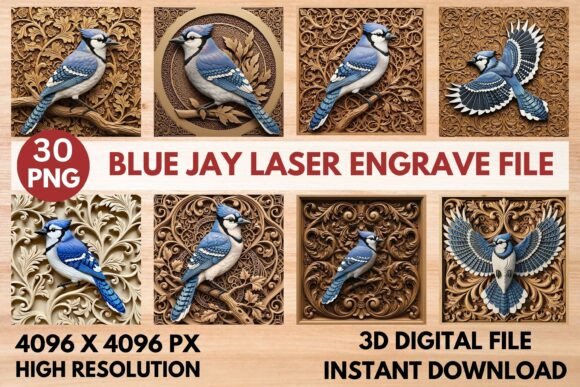
3D Blue Jay Laser Engrave File for Makers
Capture the striking beauty of the Blue Jay with this premium 3D digital relief file, perfectly optimized for laser engraving and CNC carving projects. This extensive bundle is designed for crafters, hobbyists, and professional makers on platforms like Glowforge, xTool, LightBurn, and CNC machines. Whether you are creating a custom gift for a nature lover or expanding your small business inventory, this asset provides the intricate detail needed to bring your vision to life.
The 3D Blue Jay Laser Engrave File transforms a simple flat image into a textured masterpiece. Unlike standard vector files that only outline shapes, this digital asset includes specific grayscale relief maps. These maps tell your machine exactly how deep to cut at every point, creating a realistic wood carving effect that mimics the texture of feathers and branches. It bridges the gap between digital design and tangible art, allowing you to produce high-end results without needing advanced sculpting skills.
What Makes This Digital Bundle Unique?
When searching for high-quality assets, quality often varies significantly. This collection stands out because it offers a complete workflow solution rather than just a single image. The bundle contains 30 high-resolution PNGs, carefully organized to serve two distinct purposes in your production process.
- Color PNGs: You receive 15 unique, full-color blue jay designs. These are perfect for visual mockups to show clients what the final product will look like before you ever touch a machine. They also work beautifully for full-color prints on materials that support dye-sublimation or inkjet printing.
- Grayscale Relief Maps: The other 15 files are corresponding grayscale images. In laser engraving software, white represents the highest point (no cut), while black represents the deepest cut. By using these maps, your machine automatically generates the depth variations required to create the illusion of three-dimensional fur and feathers.
All files are provided at an impressive 4096 x 4096 pixels. This high resolution ensures that even if you are engraving large pieces of wood or slate, the details remain sharp and crisp. There is no pixelation or blurriness, which is a common issue with lower-quality downloads that can ruin expensive material.
Versatility Across Materials and Projects
One of the most appealing aspects of this 3D Blue Jay Laser Engrave File is its adaptability. The 3D relief style creates an intricate wood carving texture that adds depth and dimension to any finished piece. Because the files use non-transparent backgrounds, they ensure maximum compatibility and ease of use in all major design and laser software, eliminating the need for time-consuming background removal.
You can apply these designs to a wide variety of surfaces. For woodworking enthusiasts, engraving this onto a cutting board or a serving platter creates a stunning centerpiece. The contrast between the natural grain of the wood and the carved bird design is visually arresting. If you prefer a more modern aesthetic, try engraving the design onto slate tiles or acrylic sheets. The relief effect looks particularly dramatic on dark materials where the lighter, uncut areas stand out against the engraved sections.
For those working with leather or metal, this file opens up new possibilities for personalized gifts. Imagine a custom wallet embossed with the bird's profile or a commemorative plaque made from brushed aluminum. The versatility extends to home decor as well; wall art featuring this majestic bird can become a focal point in a living room or office.
Perfect for Every Skill Level
There is a misconception that laser engraving requires years of experience to produce professional results. While practice helps, having the right tools makes a massive difference. This bundle is ideal for beginners who want to skip the trial-and-error phase of learning how to convert images to depth maps. Instead of struggling with complex settings, you simply import the grayscale file, adjust the power and speed based on your material, and let the machine do the work.
For casual users and hobbyists, the instant download feature means you can start crafting immediately. No waiting for shipping or dealing with physical media. Once you purchase the file, you have access to 15 different artistic interpretations of the Blue Jay, giving you plenty of variety for different projects throughout the year.
Professional makers and small business owners will appreciate the efficiency this tool brings to their workflow. When fulfilling orders for custom signs or gifts, consistency is key. Using a standardized, high-resolution source file ensures that every item leaving your workshop meets the same high standard. Whether you are selling on Etsy, running a local booth, or fulfilling corporate orders, these files help you scale your production without sacrificing quality.
How to Get the Most Out of Your Files
To achieve the best results with the 3D Blue Jay Laser Engrave File, consider the following practical tips. First, always run a test on a scrap piece of your chosen material. Different woods have varying densities, and a setting that works on pine might burn too deeply on oak. Second, pay attention to the direction of the light in your design. Since the relief map simulates shadows, orienting the bird so the "light" comes from a consistent angle across your entire project set will make the display look cohesive.
If you are new to LightBurn or similar software, remember that the grayscale values dictate the Z-axis movement of your cutter. You may need to experiment with the number of passes to get the desired depth. A single pass might create a subtle texture, while multiple passes will deepen the grooves for a more rugged, hand-carved look. Don't be afraid to adjust the contrast settings slightly if the initial result feels too flat or too harsh.
Why Choose This Design Over Others?
In a market flooded with generic clipart, this specific design focuses on anatomical accuracy and textural richness. The Blue Jay is known for its vibrant plumage and bold personality, and this file captures that spirit through the interplay of light and shadow created by the engraving. The inclusion of both color and grayscale options allows you to tailor the output to your specific needs, whether you are creating a marketing image or a physical product.
Furthermore, the non-transparent backgrounds save valuable editing time. Many free resources require you to manually remove white backgrounds before importing them into your laser software, which can be tedious and prone to error. With these high-quality files, you can drag and drop directly into your design environment and focus on creativity rather than cleanup.
Ultimately, this bundle is about empowering creators. It removes technical barriers and allows you to focus on the story you want to tell through your art. From educational displays in classrooms to bespoke gifts for family members, the applications are endless. By bringing your laser engraving projects to life with this beautiful bird-themed digital asset, you are investing in a tool that combines artistic beauty with functional precision.
Whether you are a seasoned pro looking to expand your catalog or a beginner eager to try your first 3D engraving, this resource offers the reliability and quality necessary for success. Start creating today and see the difference that a premium, well-optimized file can make in your work.