Christmas Star 3D Shadowbox Template
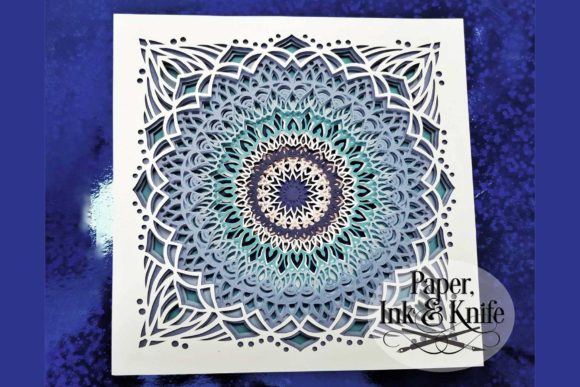
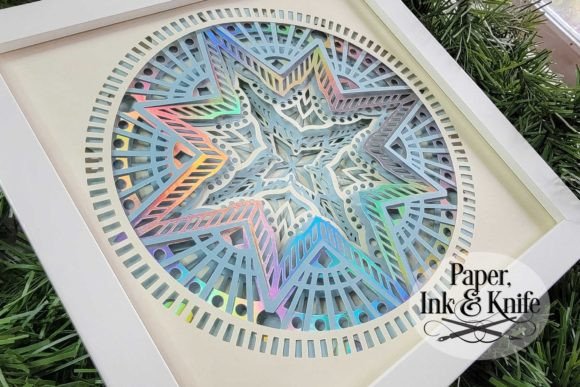
There is a specific kind of magic that happens when you take a flat piece of paper and transform it into something with depth, light, and movement. The Christmas Star 3D Shadowbox Template isn't just another digital download; it is an invitation to slow down and engage in the tactile joy of creation. Designed for those who want to add a touch of professional-grade holiday decor without spending a fortune on mass-produced items, this template offers nine layers of papery goodness that come together to form a stunning three-dimensional mandala.
At its core, this project is about customization. While the default setting suggests using crisp white paper to create a classic, ethereal look, the template is built to let your personality shine through. Imagine cutting each of the nine layers from a different color of cardstock—deep reds, icy blues, and shimmering golds—to create a vibrant burst of color that catches the eye. Or, perhaps you prefer the monochromatic elegance of all-white layers that allow the internal lighting to do the talking. Whether you are a seasoned crafter or someone who has never touched a craft knife before, the instructions make it clear: it is easier than it looks.
From Digital File to Physical Masterpiece
The versatility of this template lies in its adaptability to various tools and skill levels. The download package is comprehensive, ensuring that no matter how you choose to cut your materials, you have the right file format ready to go. For the tech-savvy creator, there are SVG files tailored specifically for Cricut users, including options where layers are stacked for quick assembly or unstacked for total control. Silhouette machine owners aren't left out either, with a dedicated DXF file available. If you prefer the meditative pace of hand-cutting, the package includes a PDF with black outlines on white paper, sized perfectly for standard letter-size printers to produce an 8 x 8 inch result.
This flexibility means you can scale the project up or down depending on your space. While the template is optimized for an 8 x 8 inch shadowbox frame, modern design software allows you to resize the elements easily. This makes it perfect for framing as a standalone art piece, hanging it on a wall without a frame, or even adapting the design for smaller gift tags or larger statement pieces for commercial displays. The final assembled depth, achieved by sandwiching double-sided foam tape between the layers, ranges from half an inch to one inch deep, creating enough separation for fairy lights to glow softly through the intricate cutouts.
Real-World Applications for Creators and Entrepreneurs
While the primary appeal is often personal decoration, the Christmas Star 3D Shadowbox Template serves a wide array of practical needs for small business owners, marketers, and educators. Consider a boutique shop owner looking to elevate their window display during the holiday season. Mass-produced decorations can be expensive and lack uniqueness. By producing these shadowboxes in-house, they can create custom branding opportunities, perhaps incorporating their store's logo subtly into the mandala pattern or using brand colors for the layered paper. The ability to resize the design allows them to fit specific window dimensions or shelf arrangements without compromising the visual impact.
For bloggers and content creators, this project offers more than just a finished product; it provides high-quality visual assets. A well-lit, multi-layered star creates a dynamic background for social media posts, blog headers, or video thumbnails. The interplay of light and shadow captured in the photos adds a layer of sophistication that flat images simply cannot match. Furthermore, the process itself is highly shareable. Documenting the assembly of the nine layers, from cutting the first sheet to placing the final fairy light, creates engaging "behind-the-scenes" content that resonates with audiences interested in DIY culture and holiday preparations.
Educational and Community Engagement
In educational settings, this template bridges the gap between technology and traditional arts. Educators can use the provided SVG and DXF files to teach students about vector graphics, scaling, and the precision required in digital fabrication. Students learn how a digital file translates into a physical object, gaining valuable skills in operating cutting machines while simultaneously exploring artistic composition. The step-by-step nature of assembling the nine layers also fosters patience and fine motor skills, making it an excellent activity for after-school programs or community workshops.
Families looking for screen-free holiday activities will find immense value here. The project encourages collaboration, where one person might operate the cutting machine while others sort the layers or apply the adhesive. It transforms the abstract concept of "making Christmas" into a tangible, shared experience. The satisfaction of seeing the flat sheets stack up to reveal the glowing 3D effect provides a sense of accomplishment that extends far beyond the initial excitement of opening a new craft kit.
Practical Considerations for Success
Before diving into the project, there are a few practical factors to consider to ensure the best outcome. Material choice is paramount. The suggestion to use 65lb cardstock is not arbitrary; lighter paper may warp under the weight of the foam tape or fail to hold the sharp edges of the mandala cuts, while heavier stock might be too difficult to fold or assemble if you are aiming for a thinner profile. Using a glue pen or stick alongside double-sided foam tape ensures that the layers adhere securely without warping the paper over time.
Lighting is another critical element. The template is designed to accommodate fairy lights between the layers, which dramatically changes the aesthetic from a static paper sculpture to a glowing centerpiece. However, users should be mindful of heat if using incandescent bulbs; LED string lights are generally safer and cooler, preserving the integrity of the paper. If you plan to leave the project unlit, the contrast between the layers becomes the primary focus, so paying extra attention to the alignment of the cuts will ensure the shadows fall correctly to create depth.
Finally, consider the workflow of your cutting machine. If you are using the stacked SVG file, you save significant time but lose the ability to mix and match colors per layer easily. The unstacked version requires more setup time but offers maximum creative freedom. For those printing manually, ensure your printer settings are set to "high quality" or "cardstock" mode to prevent ink bleeding, which could blur the delicate lines of the mandala design. With the right preparation, the Christmas Star 3D Shadowbox Template delivers spectacular results that serve as both a beautiful decoration and a testament to the power of thoughtful, hands-on creativity.